Design - Full Text Search
October 11, 2026
Last updated on October 27, 2026
The Search command can find text in paragraphs and in images. A search of many pages is slow, because OneMore must read each page from OneNote. This document explains how the text index makes the search fast. The index only narrows the search. The search gives the same results with or without it.
Related reading
Design - Page Identity explains the page key that this design uses. Design - Hashtags explains the scanner that shares its page reads with the index. TechNote - OneNote ID Stability explains why the index records the page ID.
1. Problem and scope
What is slow today
OneMore reads a page from OneNote through COM. One page read takes 35 to 90 ms. A search in all notebooks reads every page, one after the other. A user with 2,000 pages waits more than one minute for each search.
Goals
- A search that uses the index gives the same results as a search that reads every page.
- The index never writes to a page.
- The user must turn the index on. Nothing is indexed before that.
- Indexing does not make OneNote slow.
- A search never fails because of the index. If the index cannot be used, the search reads the pages.
Non-goals
- Word stemming, ranking, or fuzzy matching.
- Text of a generated table of contents.
- Sharing the index between computers. Each computer has its own index.
- Searching text in attachments.
2. Concepts
|
Term |
Meaning |
|
Paragraph |
One searchable piece of a page. It is typed text, or the text that OneNote recognized in one image. |
|
Kind |
0 for typed text. 1 for text recognized in an image (OCR). |
|
Page key |
The integer that the identity catalog gives to a page. The index uses it to know a page. |
|
Stamp |
The page ID and the modified time that the page had when it was indexed. |
|
Trigram |
A group of three characters. The index stores every trigram of every paragraph. |
|
Candidate |
A paragraph that the index returns. A candidate can match, or it can be a false positive. |
|
Chosen notebook |
A notebook that the user selected for indexing. The user can also choose to index all notebooks. |
Why trigrams
A trigram index finds a term anywhere in a paragraph, and ignores case. This is how the live search treats a term. A word index cannot find the term port in Support. The trigram index can.
The price is size. A trigram index is about three times the size of the text that it covers.
Why a stamp
OneNote can give a page a new page ID when a notebook is closed and opened again. The paragraph IDs then change too. The index records paragraph IDs, so it must index the page again. The stamp lets OneMore detect this.
3. Architecture
The index has a write side and a read side. The write side is a consumer of the background page pass. The read side is part of the Search dialog.
|
Architecture (Extract) |
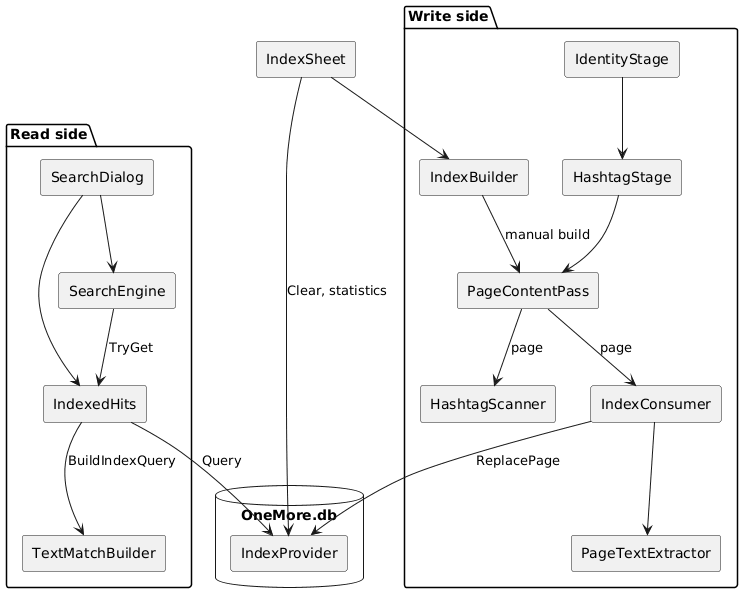
Architecture (Refresh)
Components
|
Component |
Role |
|
|
Decides which pages need indexing. Reads the paragraphs of a page and stores them. Removes data that is no longer needed. |
|
|
Indexes all chosen notebooks now, when the user asks. It has no time budget. |
|
|
The only code that reads and writes the index tables. It loads FTS5. |
|
|
Decides which paragraphs of a page are searchable. The live search and the index both use it. |
|
|
Converts the query of the user to a regular expression, and to an FTS5 expression. |
|
|
Asks the index for candidates. Tests each candidate with the regular expression. |
|
|
Uses the answer of the index for each page that has a current stamp. Reads all other pages. |
|
|
The Settings page. The user turns the index on, chooses notebooks, builds, and clears. |
Why one shared page read
The hashtag scanner and the index both need the content of a page. The PageContentPass reads each page one time and gives it to both consumers. This halves the load on OneNote. The pass also keeps the throttle, so the index does not add its own.
4. Data model
The index lives in OneMore.db, in the same file as the identity catalog.
|
Data Model (Extract) |
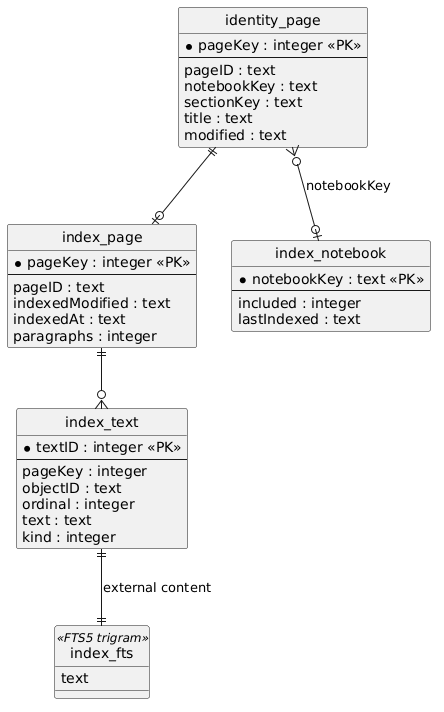
Data Model (Refresh)
|
Table |
Purpose |
|
|
One row for each paragraph. This table holds the text. |
|
|
The FTS5 index. It has external content: it points to index_text and does not keep a second copy of the text. |
|
|
One row for each indexed page. It holds the stamp. |
|
|
The choice of the user for each notebook, and when it was last indexed. |
|
|
The schema version. |
Three triggers on index_text (insert, delete, update) keep index_fts current. Only IndexProvider writes index_text, because the triggers need FTS5.
5. Behavior
5.1 Background indexing
The background pass runs after the identity pass. For each page, the consumer applies these rules.
|
Background Indexing (Extract) |
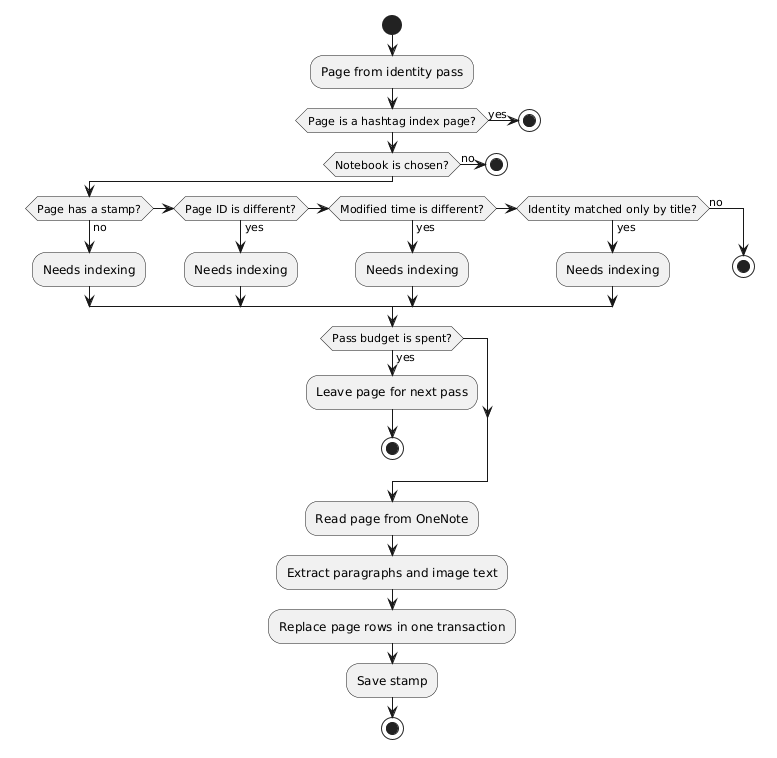
Background Indexing PlantUML (Refresh)
Notes on these rules:
- The modified time is compared for any difference, not only for a newer time. A page that the user restores from an older version is indexed again.
- A pass reads pages for at most 5 seconds. The consumer always reads at least one page, so the backlog always gets smaller.
- The consumer waits at least 25 ms after each page read.
- The first index of a large set of notebooks takes many passes. This is intended.
- The stamp holds the modified time that the page had when the pass began. This time can only be older than the page that was read. A page that the user edits during the pass is indexed again.
5.2 Build now
The user can start a build from Settings.
- The build holds back the background consumer. The two do not run at the same time.
- The build reads all chosen pages that are not current. It has no time budget.
- The build reports progress after each page.
- The user can cancel at any time.
Cancel is safe. Each page is one transaction. The background consumer continues from the place where the build stopped. A build only adds data. It never removes data.
5.3 Search
The Search dialog uses the index when these conditions are true:
- The user turned the index on.
- The scope is not a single page.
- Include table of contents is off.
|
Search Path (Extract) |
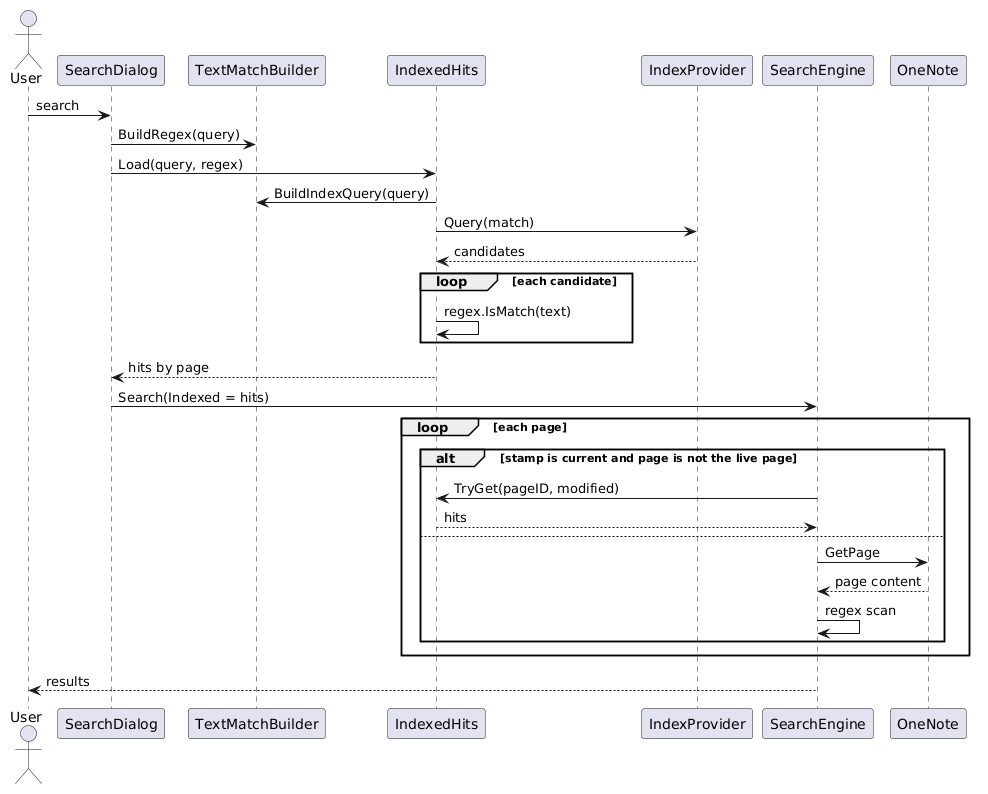
Search Path PlantUML (Refresh)
The index finds a superset
BuildIndexQuery converts the query to an FTS5 expression. The expression finds every paragraph that can match, and maybe more. IndexedHits then tests each paragraph with the same regular expression as the live search. This is why the results are the same.
|
Part of the query |
What the index does |
|
Term of 3 or more characters |
Looks up the term as a substring. |
|
Term with * |
Looks up each piece between the wildcards. A piece that is shorter than 3 characters is left to the regular expression. |
|
Term shorter than 3 characters |
Cannot narrow. The regular expression tests it. |
|
|
Keeps the parts that can narrow. Ignores the others. |
|
|
If one alternative cannot narrow, no part narrows. Every paragraph is a candidate. |
|
|
Left to the regular expression. |
|
Regular expression mode |
The index is not used. |
When the index cannot narrow the query, every paragraph is a candidate. The search is then correct, but it is not faster than reading the index table.
A page is answered by the index only when it is current
A page is current when its page ID and modified time equal the values in the OneNote hierarchy. Pages that are changed, or never indexed, are read from OneNote as before. The page that the user is on is always read, because it can have edits that OneNote did not record.
Text in images
The index always stores the text that OneNote recognized in images, with kind = 1. The query adds kind = 0 when Search text in images is off. The user can change the option without a new index.
5.4 Cleanup
|
Event |
Action |
|
The identity catalog gives up on a page |
The consumer deletes the rows of the page. |
|
The user stops choosing a notebook |
The consumer deletes the rows of the notebook. This runs one time for each change of choice, and one time at the start of a session. |
|
Start of a session |
The consumer deletes rows for page keys that the catalog does not know. |
|
The user selects Clear |
IndexProvider.Clear deletes all rows and runs VACUUM. The notebook choices stay. |
The index keeps no text of a notebook that the user does not choose. That text would become old, and it would use space.
6. Loading FTS5
The System.Data.SQLite build in OneMore does not register FTS5. The file SQLite.Interop.dll contains FTS5 and exports sqlite3_fts5_init. IndexProvider loads it into each connection.
- Enable extension loading on the connection.
- Load the entry point from the interop file. Try the name first, then the architecture folder.
- Disable extension loading again.
IndexProvider.IsAvailable runs this one time in a memory database and creates a trigram table. When this fails, the index is off and every search reads the pages.
A connection that did not load FTS5 can read all other tables. It fails on any statement that touches index_fts or the triggers. For this reason, only IndexProvider writes index_text.
7. Failure modes and open questions
Known limits
|
Limit |
Effect |
|
Terms shorter than 3 characters |
The index cannot narrow them. The search is correct but slower. |
|
OCR finishes late |
OneNote can finish OCR after the modified time was recorded. The text appears after the next change of the page or a build. |
|
Paragraph IDs change on reopen |
The page is indexed again. This is the stamp working as intended. |
|
Table of contents |
Not indexed. A search that includes it reads the pages. |
|
First index |
Takes many passes on a large set of notebooks. |
|
The index is large |
See the measurements below. |
Decisions
|
Decision |
Reason |
|
Trigram tokenizer, not word tokenizer |
It finds a term inside a word, as the live search does. |
|
External content FTS5 table |
The text is stored one time in index_text. The caller can run the exact test on it. |
|
Superset, then regular expression |
The results are the same as the live search. The index can be imprecise and still correct. |
|
Same PageTextExtractor for index and live search |
The two paths agree on which paragraphs exist. |
|
Stamp compares for difference, not for newer |
A restored page is detected. |
|
Index in OneMore.db |
One file, and the identity catalog is in the same file. Notebook of a page is a join. |
|
Opt-in |
A user who does not turn it on never gets the schema and never pays for the load of FTS5. |
Measurements
These numbers are an example from one database. They are not a guarantee.
|
Item |
Value |
|
Notebooks / pages |
9 / 1,990 |
|
Paragraphs |
103,803 typed, 1,146 image |
|
Text size |
6.8 MB typed, 0.6 MB image |
|
Index size (index_fts) |
21.4 MB typed, 2.0 MB image (about 3.2 times the text) |
|
index_text table |
13.3 MB |
|
|
42.7 MB |
|
One background pass |
About 62 pages in 5.5 seconds |
The index_text table is larger than the text. The objectID column is the likely cause. It is not measured separately.
Here are measurements across nine test notebooks, again for demonstration purposes only. Your data storage will certainly vary depending on the size of your notebooks, pages, and image OCR results.
|
Notebook |
Pages |
Text paras |
Raw text |
Text index |
OCR paras |
Raw OCR |
OCR index |
|
A |
447 |
27,761 |
1.5 MB |
4.9 MB |
418 |
300.9 KB |
896 KB |
|
B |
436 |
18,026 |
1.5 MB |
4.5 MB |
141 |
33.4 KB |
144 KB |
|
C |
129 |
13,250 |
1.0 MB |
3.1 MB |
76 |
116.3 KB |
324 KB |
|
D |
145 |
15,654 |
1,016 KB |
3.0 MB |
92 |
45.9 KB |
168 KB |
|
E |
439 |
11,214 |
752 KB |
2.4 MB |
160 |
42.0 KB |
176 KB |
|
F |
93 |
6,729 |
544 KB |
1.7 MB |
123 |
32.3 KB |
132 KB |
|
G |
157 |
7,227 |
450 KB |
1.4 MB |
116 |
43.0 KB |
168 KB |
|
H |
130 |
2,555 |
97 KB |
356 KB |
5 |
2.0 KB |
36 KB |
|
I |
75 |
1,387 |
45 KB |
192 KB |
15 |
2.6 KB |
36 KB |
|
Total |
|
103,803 |
6.8 MB |
21.4 MB |
1,146 |
618 KB |
2.0 MB |
Where that 42 MB goes:
Sizes are the stored data per table in the snapshot. B-tree page overhead and secondary indexes account for the rest of the file.
|
Component |
Size |
What it is |
|
|
21.6 MB |
The trigram index itself |
|
|
13.3 MB |
Paragraph rows: text, objectID, ordinal, kind |
|
index_fts_docsize + index_fts_idx |
0.65 MB |
FTS5 bookkeeping |
|
|
0.6 MB |
Page identity catalog |
|
|
0.3 MB |
Per-page index stamps |
|
hashtags, favorites, pinned, layouts, etc. |
~0.1 MB |
Everything else combined |
|
Free pages |
0.3 MB |
74 pages; essentially no reclaimable slack |
|
B-tree and secondary-index overhead |
~6 MB |
Not measurable directly (no dbstat); this is the remainder |
The first six rows sum to about 36.5 MB. The remaining ~6 MB is an inference from the 42.7 MB file size, not a measured figure.
- The "index" is bigger than I reported. I said the text index was about 23.4 MB, but that was only the FTS5 trigram structure. The index_text table is also part of the feature and is another 13.3 MB. All search-related storage is therefore about 36 MB, or roughly 85% of the file.
- Hashtags, favorites, identity and pinned data are negligible.
Why index_text is 13.3 MB for only 7.4 MB of text
- The raw text is only about 7.4 MB (6.8 MB typed plus 0.6 MB OCR).
- The objectID column is the likely culprit. OneNote object IDs look like {1}, around 50 characters each. Over 105k paragraphs that comes to about 5 MB stored per paragraph row. I haven't measured the column's size directly.
- The remainder is small. The ordinal and kind integers and the IDX_index_text_pageKey index add little.
What this means
- Text is stored twice. Once in index_text and once, as trigrams, in the FTS index.
- Trigrams are expensive. Every 3-character window becomes an entry, which is why the index runs about 3x the text.
- The WAL is separate. It adds another ~7 MB on disk next to the main file.
Open questions
- Is it better to resolve the objectID when a hit is shown, and not store it for each paragraph? This could save about 5 MB in the database above.
- Does detail=column in FTS5 reduce the size and keep the results correct? Phrase queries could be affected.
- Does FTS5 load correctly on ARM64 and in the tray process? It is not verified.
8. Testing strategy
|
Area |
Approach |
|
|
Use an in-memory SQLite connection. Use the IndexProvider(SQLiteConnection) constructor. |
|
|
Test each row of the decision in section 5.1. |
|
|
Test short terms, wildcards, AND, OR, NOT, and regular expression mode. |
|
|
Compare the hits of the index with the hits of a full scan of the same pages. They must be equal. |
|
Cleanup |
Test purge, prune of unchosen notebooks, orphan sweep, and clear. |
|
Build and cancel |
Cancel in the middle. Check that the next pass continues and no page is partial. |
#omwiki #omdeveloper #omdesign
© 2026 Steven M Cohn. All rights reserved.
Please consider a sponsorship or one-time donation to support ongoing development
Created with OneNote.